

Choosing POS seems to be an easy task until something goes wrong. There was one shop owner in Dhaka who chose the cheapest POS, only to realize later that it could not manage bar coding billing. There was another one who had paid a huge installation fee, only to discover that technical support is only available during office hours. Neither of these stories is rare. Proper POS software comparison before purchase will help you to avoid months of trouble and many takas. Below we discuss what to compare, how much POS software in BD costs and what to avoid. The guide is meant for shop owners, pharmacists, traders and SMEs in Bangladesh.
The Importance of a POS Software Comparison Before Purchase
Most businesses rarely change their POS software. Moving products, customers and suppliers from one platform to another takes some time and effort. That is why the first choice of POS is very important. A POS software comparison will help you to avoid three main dangers.
Buying features you won’t ever use.Some solutions are designed to work in big enterprises, and you will be paying for some unused tools.
Lacking important features when you start. For instance, barcode billing, due dates control and branch reporting features are difficult to implement later on.
Poor service when the POS fails. The system works on a daily basis at the billing counter, and when something goes wrong at the peak hours, you need professional help immediately.
What Is POS Software and How It Works?
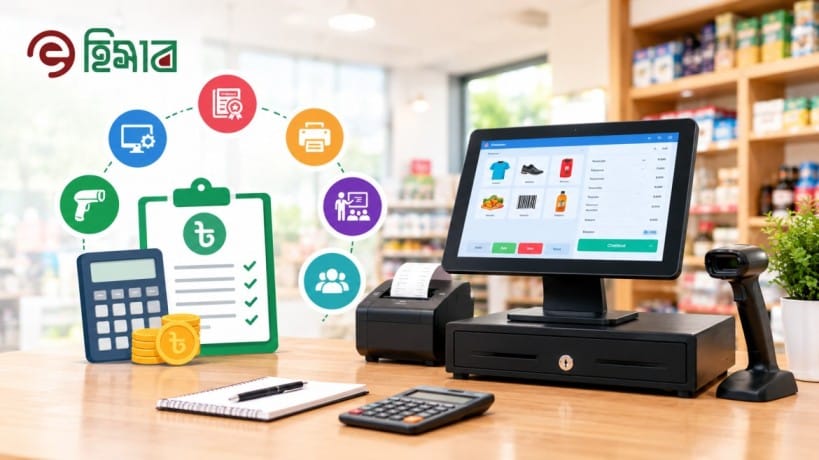
The POS abbreviation stands for “point of sale”. The POS software is the application that works on your billing desk. As soon as the transaction happens, the program will record it, compute the total, apply any discount or VAT, print an invoice and decrease stock balance automatically.
In modern software solutions, there is much more than billing. The quality solution should not only record sales but maintain your customer database, control how much you owe to suppliers, display daily accounting statements, and let you track the state of your business using a smartphone.
Key Factors in a POS Software Comparison
The longer the list of features provided by vendors, the less number of criteria can really determine the functionality of the POS solution in a real Bangladeshi store. Here are nine of those key points that can become your evaluation checklist.
1. Usability and Bangla Language Compatibility
Your cashiers will use the system throughout the day, and not everybody is technologically advanced. Consider a clear display, fast billing and a user-friendly interface in your native language. If a new cashier cannot understand the basics of using the software within two days, then it is too complex.
2. Stock Control and Barcode Management
Inventory control is the main function of any POS system. It should allow you to add products manually or automatically, search for them according to their brand name, product type or bar code, and also check the available stock of the goods. Automated creation of bar codes will save your time, especially if the product does not have a barcode yet.
3. Billing, VAT and Discounts
Fast and efficient billing is a must. Ensure that you can provide either a fixed or percentage discount, VAT either at a fixed or a percentage rate, returns and refund facility, print invoices via a regular printer and POS receipt printer. Contact your accountant for invoice details that you will require and ensure the software can provide them.
4. Cloud Access and Internet Stability
Internet cloud based POS software allows you to monitor sales from wherever you want using any device including your phone, laptop or tablet and data automatically gets backed up. The problem is internet stability. Find out how the system handles a few minutes of poor internet connection and whether it ensures your counter operates normally and synchronizes all the data once the connection stabilizes.
5. Customer, Supplier and Due Tracking
Credit sales and supplier dues form part of the life of many traders in Bangladesh. The POS system should track customer due amounts, payments received through cash, mobile bank account or credit cards. Having the ability to import your customer details with due amounts saved days of data entry.
6. Reports and Multi-Branch Control
Report turns raw sales figures into actionable decisions. Expect reports on sales per day, profit/loss, item-wise performance and inventory. In case you manage or are planning to manage more than one shop, make sure the number of branches supported by each system is known and whether it is possible to see all branches in one screen.
7. Data Security and Backing up
Your sales and inventory details represent your company’s memory. Ask about automatic backup to the cloud, encryption, and other forms of security such as multi-factor authentication. Also ask whether it is possible to control access to data by every individual in your organization, such as a cashier opening your financial reports.
8. Hardware Compatibilities
POS is made up of two components – software and hardware. Your POS software should be compatible with common devices like a barcode reader, receipt printer and perhaps even a cash drawer. Also, make sure that the software vendor provides a bundled solution for easy deployment.
9. Local Support and Training
If the system goes down on a busy Friday night, the video guide is not good enough. Go for the one with local support who can respond fast and train your staff and help you import existing information. Round-the-clock support works well for late-opening stores.
Cloud vs On-Premise vs Mobile vs ERP POS
As important as the vendor is the type of POS you choose. Below is a quick review of the four types of POS available in the market.
POS type | Best for | Main strength | Watch out for |
|---|---|---|---|
Cloud POS | Shops and SMEs that want access anywhere | Works on any device, automatic backup | Needs a reasonably stable internet connection |
On-premise POS | A single counter with poor internet | Runs on a local computer | Manual updates, no remote access, hardware failure risk |
Mobile POS | Small sellers and on-the-go sales | Low cost and portable | Fewer features and lighter reports |
ERP-based POS | Large firms with complex operations | Accounts, HR and production in one system | Higher cost and a longer setup |
For most small to mid-size business owners in Bangladesh, the cloud POS is the ideal option due to its price, features and ease of use.
Price of POS Software in Bangladesh: How Much to Budget
The prices differ because vendors charge in different ways. Some vendors offer a single licence while others go for subscription and installation. When comparing quotes, remember to include the total cost for the first year rather than using the headline price. These are included in the total:
The software subscription or licence
Hardware such as computer, scanner, printer, and cash drawer
Training and support costs
Additional locations or users
For instance, below are Ehishab’s current plans. The prices quoted are taken from the Ehishab pricing page and could be subject to changes, hence ensure you verify from the POS software price in Bangladesh page.
Plan | Monthly fee | Installation | Branches | Support |
|---|---|---|---|---|
Silver | 1,000 Tk | 15,000 Tk | 1 | 24/7 |
Gold | 1,500 Tk | 25,000 Tk | Up to 3 | 24/7 |
Platinum | 3,000 Tk | 30,000 Tk | Up to 7 | 24/7 |
Custom | 5,000 Tk | 80,000 Tk | Unlimited | 24/7 |
The Hardware comes separately. Ehishab shows thermal receipt printers, barcode scanners, cash drawers and hardware bundle priced at 28,000 Tk. This could be useful especially if you would like to buy everything from one source.
Potential Hidden Costs to Avoid
Setup costs not listed in the initial quotation
Costs for every additional branch or user
Paid for updates/support beyond the first year
Costs for exporting your data in case you change POS providers
Ensure you get a written quotation of all the costs.
Which POS System Would Best Suit Your Business?
Each business depends on various aspects. This can be used as a guideline while you narrow down your options.
Grocery and super markets: rapid billing with barcodes, discounts and stock management alerts.
Pharmacies: quick searching of products and precise stock records. Enquire about batch and expiration date management if you require it.
Electronics and fashion stores: extensive database, per product reporting and returns.
Traders and dealers: accounts receivable, accounts payable and purchases tracking.
Restaurants and cafés: rapid billing and inventory control based on ingredients.
Multisite businesses: single dashboard and effortless stock transfers from one site to another.
How Ehishab Measures Up To Your POS Software Checklist
Ehishab is a cloud-based POS software created by Fara IT Fusion Limited for small and medium-sized businesses. The following is a comparison of the same with the checklist above.
Ease of use: An easy-to-use interface even without much knowledge of accounting, with Bangla interface facility.
Stock: Upload products in unlimited number either individually or in bulk, custom-made barcodes, generate stock statement of any particular product, search product by brand, type, specification or barcode.
Invoicing: Discount facility either on fixed amount or percentage basis, VAT either on fixed amount or percentage basis, returns & refund facility, invoice printing on POS printers and normal printer, and automated SMS & invoice sending.
Access on Cloud: Access to the software from anywhere with a web-based interface using a desktop/laptop/tablet/smartphone with internet connection.
Accounting: Import past customer list with dues, payment entry of cash, mobile banking or card, and supplier and warehouse information.
Security: Automatic backup, encryption and multi-factor authentication.
Support: Support all the time on every subscription plan, including courier service management facility.
Ehishab is meant primarily for super shops, pharmacies, trade and dealerships, as well as other SMEs. In case you have an extremely big business, which requires ERP modules, including production planning, look at the full ERP option too. Otherwise, live demonstration will be the best way to see how it fits you. All other businesses go live within days after the import of product information.
7 Common Mistakes in POS Software Selection Process
Relying on price only. You will pay more for the cheapest plan if it does not include the function you will need within half a year.
Dismissing demo version. Screenshots are no substitute for real feel of the software at the working counter.
Neglecting power outages and internet failure. You should ask about the system performance during the outage.
Failing to take hardware into account. Scanners, printers and drawers cost much.
Lacking the growth perspective. Consider what will happen when you open your second branch.
Overlooking staff training. No matter how great the software, your employees will not be able to use it otherwise.
Failing to check data ownership. You should know whether you can export your data whenever you want.

How to Test a POS System Before Committing
Demo is your best comparison method, be prepared before calling.
Bring ten real products and ask the vendor to load them live.
Proceed with sale through discount and VAT, print the receipt.
Ask for return, credit sale, supplier purchase demo.
Open daily sales, stock, profit reports.
Inquire about backups, support hours, export facility of data.
End by asking two or three current users about their experience. Feedback of another store owner will be more valuable than brochures provided by vendor.
Frequently Asked Questions about POS Software of Bangladesh
Which is the best POS software in Bangladesh?
This question cannot be answered with certainty since the best POS system is the most suitable one for your business. With the help of the above mentioned checklist, you can pick up two or three systems and test them through live demo. Ehishab provides all features of a POS system including inventory, billing, due tracking starting from 1,000 Tk per month.
What is the price of POS software in Bangladesh?
It depends on the supplier, number of branches and hardware required. There will be monthly or annual subscription cost for software along with installation cost. The starting price of Ehishab POS is 1,000 Tk/month with 15,000 Tk installation cost.
Does POS software work with slow internet connection?
The cloud-based POS software requires an internet connection for synchronization, however, well-designed POS will not face any issue and will synchronize your data whenever the connection comes back. It is always better to ask about it from the vendor and check it during the demo period.
Is POS software good for a small business like shop?
Yes, even a small shop having only one counter will get benefit from POS software through efficient billing, precise inventory tracking and detailed reports of daily activities. The starter plan offered by most POS providers including the Ehishab POS for only one branch is affordable.
How much time is needed to install POS?
Small or medium-sized enterprises can get started within a few days once the data of the products gets imported and employees have been trained.
Closing Thoughts on Selecting POS Software in BD
It is safe to say that POS software selection revolves around just one thing. Find out which software works for you by comparing user-friendliness, inventory management and billing features, availability of cloud storage services, security, and real cost with local customer service.
Book Your Free Ehishab POS Demo Now
Want to see it work with your own merchandise? Contact Ehishab at 01780504501 or book a free demo on ehishab.com . Let us know what kind of business you have and the number of branches you have and we’ll set up a customized solution for you. You can also send an email at info@ehishab.com or visit us at Suite # 1205, Level 11, Shah Ali Plaza, Mirpur-10, Dhaka 1216.